- DATE:
- AUTHOR:
- The SPARK Team
SPARK 8.2.8 Release Notes
The SPARK 8.2.8 release is planned for Friday, July 17th. This update introduces versioned personal debt schedules, more control over how Document Analysis results are applied, and new fields in the SPARK reporting and import APIs.
The maintenance window will occur from 11:00 PM CT on Friday, July 17th through 9:00 AM CT on Saturday, July 18th.
Release Highlights
The Personal Debt Schedule now supports two versions side by side, so analysts can pull a fresh credit report into a new draft without losing manual entries, then apply it when ready.
When applying Document Analysis results, analysts can update an existing analysis or create a new one, and choose which periods to bring in year by year.
Credit workflows received visual updates across the Credit Reports order, add, and edit screens and Credit History in Individual Analysis.
New fields were added to the Reporting and v3 Import APIs, including stage-level status wait times, maturity and payment overrides, prior liens, collateral owners, and USDA loan details.
What's New
Personal Debt Schedule versioning
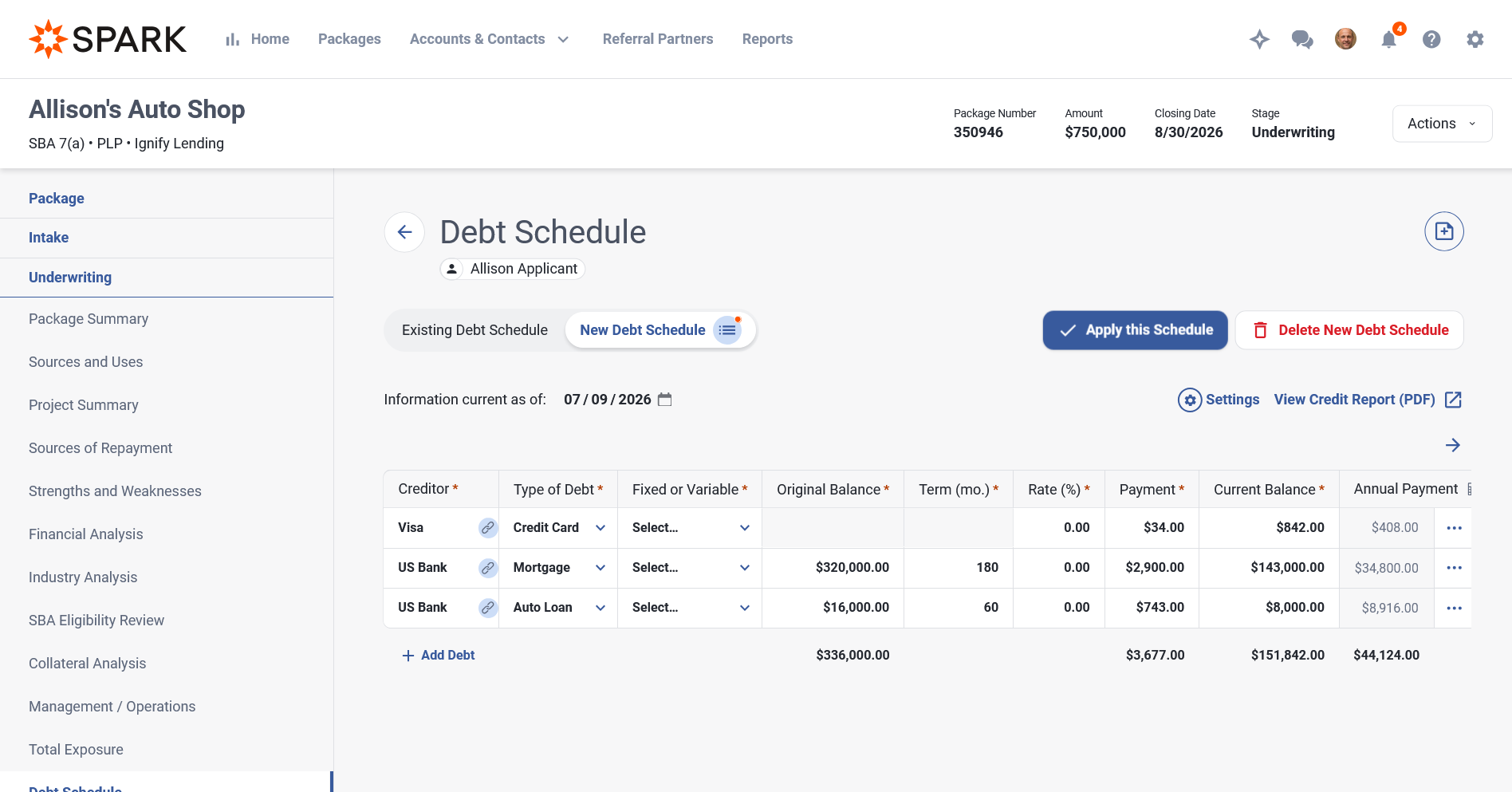
A personal debt schedule can now hold two versions: an existing version and a new draft generated from a fresh credit pull.
Pull a fresh credit report into a New draft without losing manual modifications to the existing debt schedule. The draft won't affect a previously saved debt schedule until you apply it.
An Existing/New toggle appears once a draft exists, so you can compare and edit each version independently.
Apply promotes the draft to your saved schedule, keeping any manual changes. You can also delete the draft debt schedule.
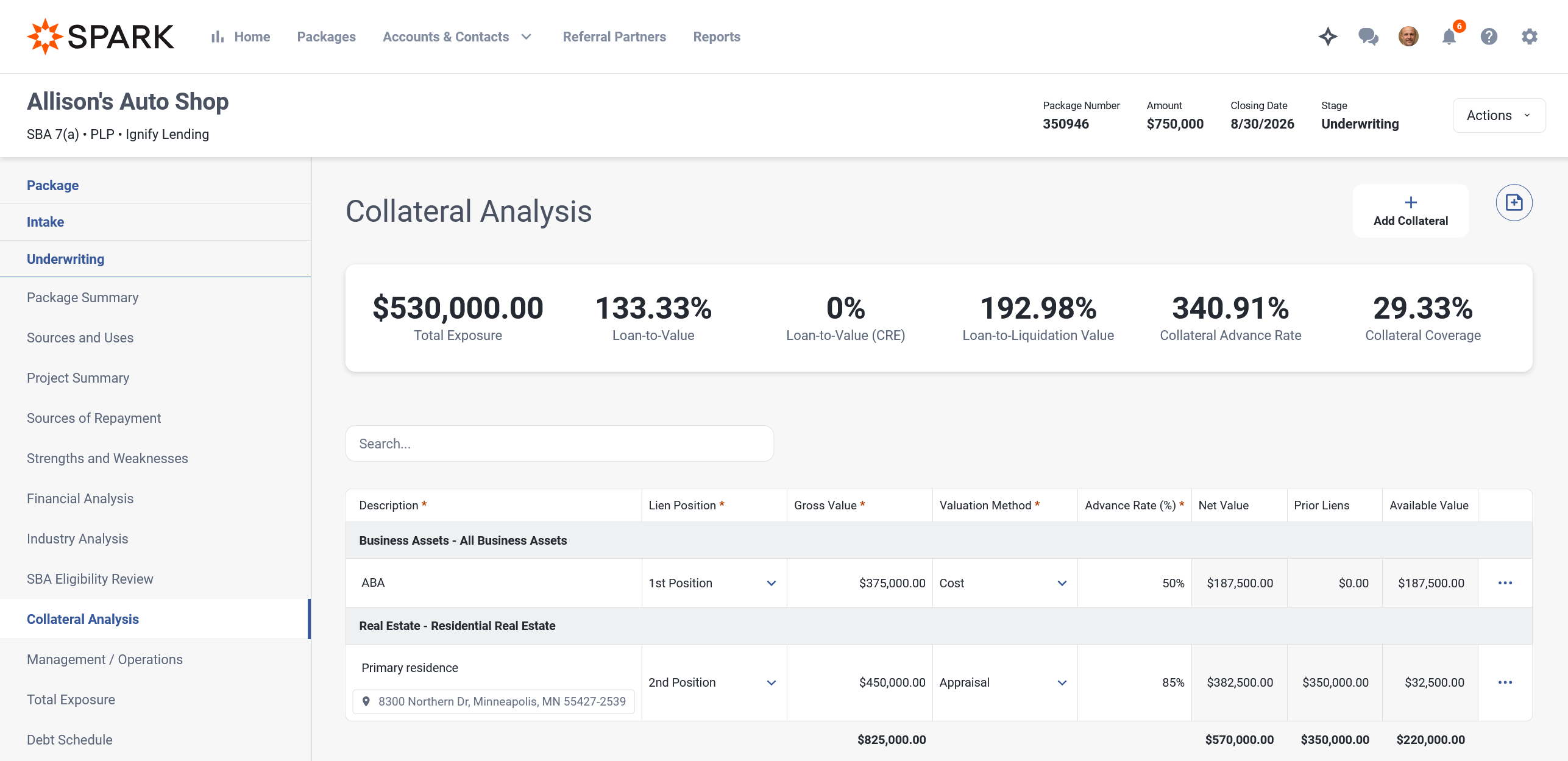
Real estate address shown in the Collateral list
For real estate collateral, the property address now appears in the Collateral list, making it easier to tell apart several real estate items on the same package.
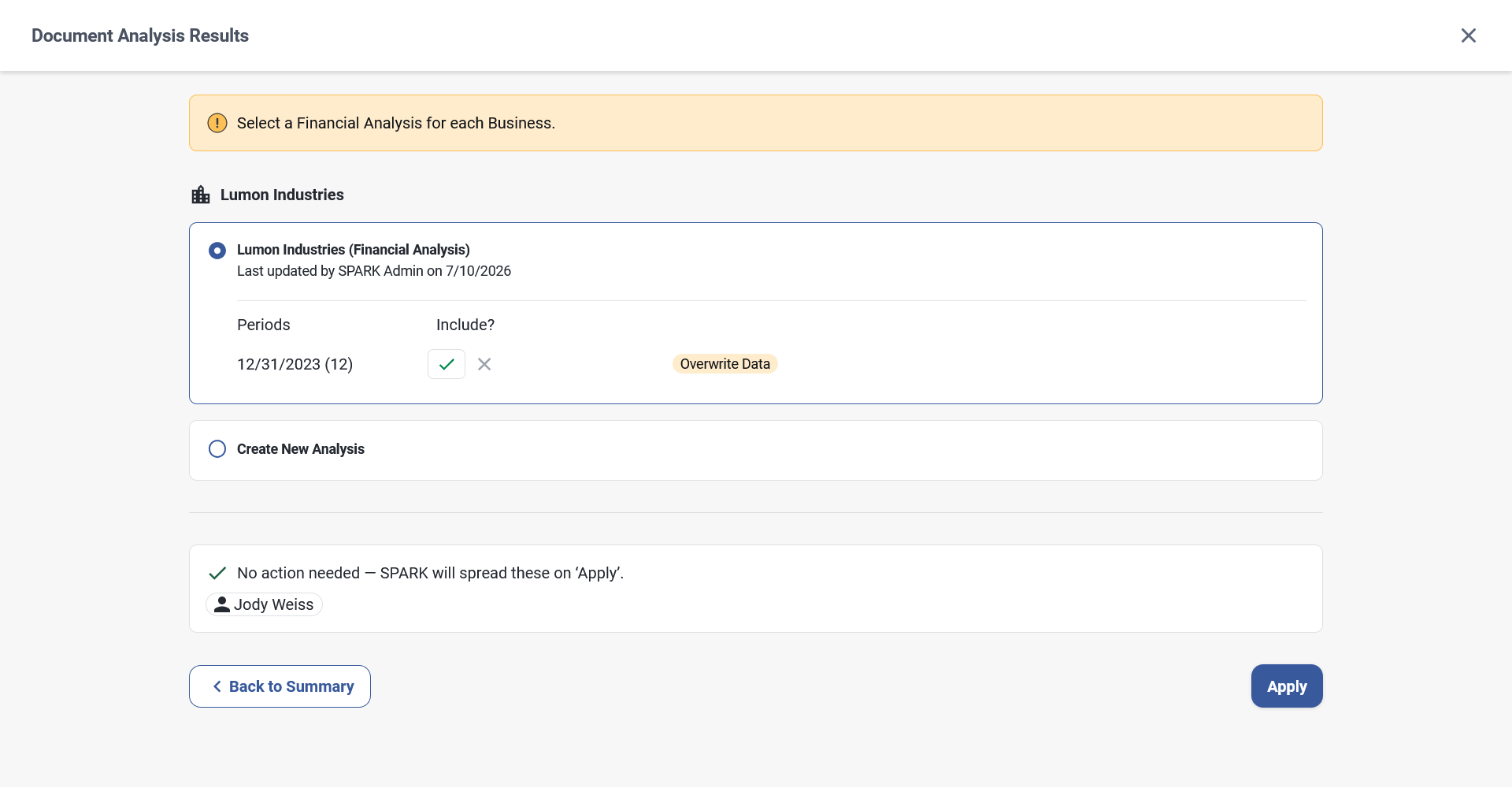
Choose whether to update an existing Document Analysis or create a new one
When you apply data to an existing package that's auto-spread from a tax return, SPARK now checks whether that business or individual already has an analysis on the package.
If an analysis already exists, you will be asked whether you want to create a new analysis add an existing one, as well as which periods to include.
What's Updated
Usage limit messages for Automated Classification of Documents
Document Auto-Classification now shows a clear message when a usage limit is reached. These messages appear for users with the appropriate permission, both in Auto-Classification and on the Classify AI panel.
Order, Add, and Edit Credit Reports
The screens for ordering credit reports as well as adding or editing manual credit reports have been visually refreshed.
Credit History in Individual Analysis
When the Include in Memos toggle is set to No, a "Hidden from Credit Memo" indicator appears.
If an individual does not have a credit report, the empty state now directs you to Scoring, where you can add or order a report.
A "Go to Scoring" action is also available in the Settings panel.
Debt Schedules grouped by entity in Memos
The Debt Schedules section of a Credit Memo now shows one debt schedule per business or individual, rather than combining all entities' entries into a single table.
Show or hide debt schedules in Memos
In the standalone Debt Schedules feature, both personal and business debt schedules can be shown or hidden in a Credit Memo. They are shown by default.
API v3 General Updates
Loan Terms - Negative Spread: The v3 API now accepts a negative spread when creating or updating loan terms, matching the rest of SPARK. A negative spread is a valid value (it produces an effective rate below the index), and the API previously rejected it.
Packages - SBA Loan Number with a Dash: The Create Package and Update Package endpoints now accept SBA Loan Numbers that include a dash (for example 49301032-41). Previously the validation allowed only 10 digits and rejected the standard dashed format.
Business Ownership - Can Sign When Adding an Owner: The create-owner endpoint now lets you set the Can Sign flag when adding an owner to a business. Before, a new owner was always created with Can Sign set to Yes, with no way to set it to No through the API.
Accounts - Business Name Length: The create-account endpoint now accepts business names longer than 50 characters, matching what the SPARK interface already allows. The two previously enforced different limits, which could cause imports to fail.
API v3 Improved Loan Boarding Support
These enhancements let integrators board existing and modified loans through the v3 API with their actual serviced values, instead of having SPARK recalculate or omit them:
Outstanding Balance and Total Exposure: You can now set a package's outstanding balance and total exposure when creating or updating it, so boarded loans reflect their current serviced balance instead of only the original financed amount.
Overridden Payment Amount The terms API now accepts a payment amount, so a modified loan carries its actual serviced payment instead of a value recalculated from the original amount and term.
Overridden Maturity Date: The source API now accepts a maturity date, so a restructured loan carries its actual maturity instead of a date recalculated from term and closing date.
USDA Loan Details: You can now set a package's USDA details (loan number, authorization date, and guaranty percent), so USDA B&I loans carry their USDA information instead of being left unrecorded.
Prior Liens on Collateral: The API can now record and retrieve prior liens on a collateral item (create, list, read, update, and delete), so a loan sitting behind a senior lienholder carries its full lien stack.
Collateral Owners: The API can now record and retrieve who owns (pledges) a collateral item (create, list, read, update, and delete), so collateral pledged by a guarantor or affiliate carries its ownership link.
Reporting Updates
Stage-Level Status Wait Times: The reporting API adds 18 new fields that break down status wait times by pipeline stage. For each of the six stages (Lead, Intake, Underwriting, Packaging, Closing, Funding), there are separate day counts for On Hold, Pending Acceptance, and Awaiting Assignment.
Values are integers (business days), and null if the package never entered that status in that stage.
Available on GET /api/v3/reporting/packages and /packages/{id}, and on GET /api/v2/reporting and /reporting/{id}.
The existing OnHoldDays aggregate field is unchanged. All new fields are additive and opt-in via v3's $select.
Secondary Market Eligibility: The reporting API no longer returns secondary-market details (such as status and sold amount) for packages that are not eligible to be sold on the secondary market, so downstream reporting reflects each package's eligibility correctly.
Full field reference and query examples are available in the API documentation.
What's Been Fixed
Disappearing Period Columns in Financial Analysis: When you typed a value into a cell and pressed Enter in Financial Analysis, the left-most period column would become hidden. Hitting the Enter key no longer hides the first period column. This was included in a hotfix.
Spread Column Visibility in Financial Analysis: Spreads now fit more period columns on screen at once. Before, the columns were wider, so users on standard monitors often had to scroll or zoom out to reach and fill in the right-most periods. This was included in a hotfix.
Debt Schedule Visibility in Memos: Debt schedules now show up in memos as expected. Previously the Business Debt Schedule could be left out even when it was complete, and debt schedules were being defaulted to hidden. They now default to being included in the memo. This was included in a hotfix.
Malformed Closing Statement: If a closing statement included more than 1 page of fees, the generated PDF would include several blank pages. We have updated how the PDF is generated to prevent this going forward. This was included in a hotfix.
Location ID Number on SBA Form 1050: The SBA Form 1050 used to fill in the Lender FIRS number but leave the SBA Location ID Number blank. It now shows the SBA Location ID first, and uses the FIRS number only when no SBA Location ID is available.
Referral Partner Agent Stage Change Validation: You can now move a package to Closing when the referral came from a referral partner who charges no fee. Before, SPARK was requiring that an agent be documented even though one was not needed.
Annual Payment Column in the Debt Schedule: The Annual Payment column on the debt schedule no longer goes blank for every row when one entry is missing a payment amount.
Sub-Account Action Menu in Financial Analysis: The row menu (Add Comment and Delete Sub Account) is now easier to open. It used to sit on top of a "drag and drop" handle, so clicking it would often start moving the row instead of opening the menu.
Flood Insurance Error in Insurance Requirements: Answering No to the Flood Insurance question no longer shows an error at the top of the insurance requirements page and now saves reliably. This happened on loans that had a companion loan which was later deleted.
Handle Deleted Companion Package in a Decision Request: You can now open decision tracking on a package after its companion package has been deleted. Before, the page would show an error.
SBA Authorization Requirements in Settlement Statement - : The settlement statement now properly groups authorization requirements associated to the "Other" category instead of listing a separate line for each.
Companion Package Shared Icon on Dashboards: On Dashboards, the shared icon now clears once a companion package is deleted, so it correctly reflects whether a package is still part of a companion relationship.
Fiscal Year End in Business Information: When you create a business from an existing account, its fiscal year end month now matches the value originally set for the account. Before, it always defaulted to December, so businesses with a non-December fiscal year end would be set incorrectly on new loan packages.
SBA Guaranty Percent and Fee in SPARK API: When a package was created through the API with an SBA loan number already provided, the SBA guaranty percent was saved at the wrong scale (showing as 0.75% instead of 75%) and the guaranty fee was never calculated, staying at $0. Both now calculate correctly.
Performance Improvements: Continued performance-related improvements across several areas of the application to improve page load times and overall responsiveness, including a fix that keeps the dashboards from stalling under heavy use.
If you have any feedback or questions, please reach out to your Customer Success Manager or submit a ticket to the SPARK Support Team.