- DATE:
- AUTHOR:
- The SPARK Team
SPARK 8.3.1 Servicing Release Notes
The SPARK 8.3.1 release is planned for Saturday, November 7th. The maintenance window will occur from 11:00 PM CT on Saturday, November 7th through 9:00 AM CT on Sunday, November 8th.
What's Changed
Score change indicators on the Scoring Dashboard
Redwood and personal credit score cards in the servicing workspace now show how many points a score moved since the previous one, with a green up triangle ("▲ 3") or a red down triangle ("▼ 6").
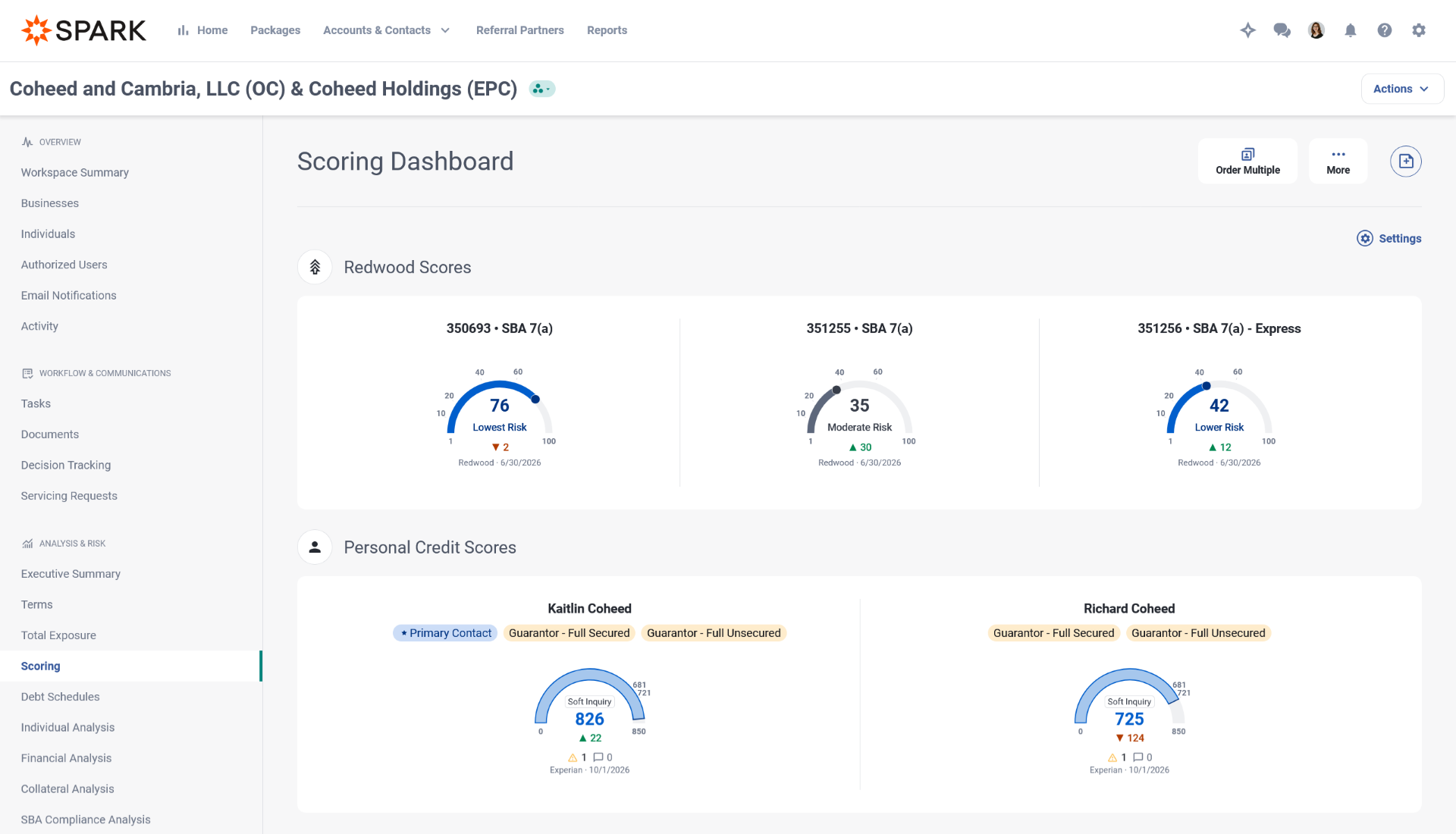
A Redwood card compares against that package's previous Redwood score.
A personal credit score card compares against the individual's next most recent scored report, even from a different bureau.
No indicator shows for a first score, an unchanged score, or a frozen or no-data report.
Existing scores show indicators following the release.
Servicing for workspaces without SBA packages
Workspaces that hold only non-SBA packages no longer show SBA-specific content, so servicing fits conventional portfolios. SBA content appears as soon as an SBA package is added.
Workspace Summary hides the Servicing SOP and Servicing Matrix fields.
The Scoring Dashboard hides the Redwood Scores section. In a workspace with both kinds of packages, Redwood cards show for SBA packages only.
On Servicing Requests, Servicing SOP Version and Servicing Matrix Version each gain a "None" option. A new request in a workspace with no SBA packages sets both to None automatically.
Decisions on the workspace memo list
Last Activity on the workspace memo list now shows decision status for Annual Review Memos and Servicing Request Memos, matching the package Credit Memo list. An open decision reads "Decision Request is in progress", and a finalized one shows the outcome and date. Memos finalized before this release show their decision too.
Redwood risk description in Servicing Memos
The Loan Summary section of Annual Review and Servicing Request memos now shows the Current Redwood Score with its risk description, for example "58 - Lower Risk".
Zip code and use of funds on the Servicing Packages Report
The Packages in Servicing sheet now includes Primary Business Zip Code and Primary Use of Funds columns, right after Primary Business NAICS Code. This helps Portfolio Managers find packages in a disaster area and separate real estate exposure from unsecured exposure. Zip codes keep their leading zeros.
Servicing data through the SPARK API
Integrators can now reach servicing workspaces through version 3 of the SPARK API, so changes from your core no longer have to be re-keyed into SPARK.
List and read servicing workspaces and the packages in them, and change a package's servicing status. Moving a package to an inactive status waives open tasks and writes a workspace note, the same as the Edit Servicing Status screen.
Read and update the servicing terms on each workspace package, including rate, payment, maturity, late payment and prepayment penalty details. Updates follow the Terms screen's own validation, and prepayment penalty fields are read-only.
List, read, create, delete, upload and download workspace documents and their versions, using the document types in your servicing configuration. Uploads follow the same file type checks and 100 MB limit as the Documents screen.
The API role screen gains a Servicing group of permissions. Existing origination permissions do not grant access to servicing data.
The published API documentation covers every new endpoint, its fields, validation messages and required permission.
What's Been Fixed
AI Document Classification in Servicing: Fixed an issue where classifying a bulk uploaded document in a servicing workspace returned an error. This was included in a hotfix.
Accepting Interest-Only Loans in Servicing: Fixed an issue where a loan with interest-only payment terms could not be accepted into a servicing workspace and showed the message "Amortization is not valid for Interest Only payments." This was included in a hotfix.
Recurring Schedule Create and Due Rules in Servicing: Fixed an issue where changes to the Create and Due rules on an existing recurring schedule were not kept after saving. This was included in a hotfix.
PFS Notes as Servicing Memo Footnotes in Individual Analysis: Fixed an issue where notes added to a Personal Financial Statement in a servicing workspace could not be included as footnotes in the Servicing Memo. The Add a Note panel now includes an "Include as a footnote in the Servicing Memo" checkbox.
Find Out More
If you have any feedback or questions, please reach out to your Customer Success Manager or submit a ticket to the SPARK Support Team.
The SPARK 8.3.1 release is planned for Saturday, November 7th. The maintenance window will occur from 11:00 PM CT on Saturday, November 7th through 9:00 AM CT on Sunday, November 8th.
What's Changed
Score change indicators on the Scoring Dashboard
Redwood and personal credit score cards in the servicing workspace now show how many points a score moved since the previous one, with a green up triangle ("▲ 3") or a red down triangle ("▼ 6").
A Redwood card compares against that package's previous Redwood score.
A personal credit score card compares against the individual's next most recent scored report, even from a different bureau.
No indicator shows for a first score, an unchanged score, or a frozen or no-data report.
Existing scores show indicators following the release.
Servicing for workspaces without SBA packages
Workspaces that hold only non-SBA packages no longer show SBA-specific content, so servicing fits conventional portfolios. SBA content appears as soon as an SBA package is added.
Workspace Summary hides the Servicing SOP and Servicing Matrix fields.
The Scoring Dashboard hides the Redwood Scores section. In a workspace with both kinds of packages, Redwood cards show for SBA packages only.
On Servicing Requests, Servicing SOP Version and Servicing Matrix Version each gain a "None" option. A new request in a workspace with no SBA packages sets both to None automatically.
Decisions on the workspace memo list
Last Activity on the workspace memo list now shows decision status for Annual Review Memos and Servicing Request Memos, matching the package Credit Memo list. An open decision reads "Decision Request is in progress", and a finalized one shows the outcome and date. Memos finalized before this release show their decision too.
Redwood risk description in Servicing Memos
The Loan Summary section of Annual Review and Servicing Request memos now shows the Current Redwood Score with its risk description, for example "58 - Lower Risk".
Zip code and use of funds on the Servicing Packages Report
The Packages in Servicing sheet now includes Primary Business Zip Code and Primary Use of Funds columns, right after Primary Business NAICS Code. This helps Portfolio Managers find packages in a disaster area and separate real estate exposure from unsecured exposure. Zip codes keep their leading zeros.
Servicing data through the SPARK API
Integrators can now reach servicing workspaces through version 3 of the SPARK API, so changes from your core no longer have to be re-keyed into SPARK.
List and read servicing workspaces and the packages in them, and change a package's servicing status. Moving a package to an inactive status waives open tasks and writes a workspace note, the same as the Edit Servicing Status screen.
Read and update the servicing terms on each workspace package, including rate, payment, maturity, late payment and prepayment penalty details. Updates follow the Terms screen's own validation, and prepayment penalty fields are read-only.
List, read, create, delete, upload and download workspace documents and their versions, using the document types in your servicing configuration. Uploads follow the same file type checks and 100 MB limit as the Documents screen.
The API role screen gains a Servicing group of permissions. Existing origination permissions do not grant access to servicing data.
The published API documentation covers every new endpoint, its fields, validation messages and required permission.
What's Been Fixed
AI Document Classification in Servicing: Fixed an issue where classifying a bulk uploaded document in a servicing workspace returned an error. This was included in a hotfix.
Accepting Interest-Only Loans in Servicing: Fixed an issue where a loan with interest-only payment terms could not be accepted into a servicing workspace and showed the message "Amortization is not valid for Interest Only payments." This was included in a hotfix.
Recurring Schedule Create and Due Rules in Servicing: Fixed an issue where changes to the Create and Due rules on an existing recurring schedule were not kept after saving. This was included in a hotfix.
PFS Notes as Servicing Memo Footnotes in Individual Analysis: Fixed an issue where notes added to a Personal Financial Statement in a servicing workspace could not be included as footnotes in the Servicing Memo. The Add a Note panel now includes an "Include as a footnote in the Servicing Memo" checkbox.
Find Out More
If you have any feedback or questions, please reach out to your Customer Success Manager or submit a ticket to the SPARK Support Team.