- DATE:
- AUTHOR:
- The SPARK Team
- RELATED ROADMAP ITEMS:
- Add Flexibility to Total Exposure
SPARK 8.2.7 Release Notes & Webinar
The SPARK 8.2.7 release is planned for Saturday, May 23rd. This update includes updates to Financial Analysis and Total Exposure. The maintenance window will occur from 11:00 PM CT on Saturday, May 23rd through 9:00 AM CT on Sunday, May 24th.
If you missed the webinar or would like to share it with your team, you can access the recording here.
Release Highlights
Total Exposure has been redesigned. Inclusion now follows shared borrowers and guarantors, balances can be edited directly in the table, and a new Settings panel controls what's included. Lenders can also add debt obligations on their own, without creating a full package first.
Financial Analysis & Consolidated Analysis have a refreshed look and feel, with new indicators that show at a glance whether a value is synced or has been overridden.
AI document classification confidence scores have been revised and reasoning is explained in a clearer, structured format.
Terms
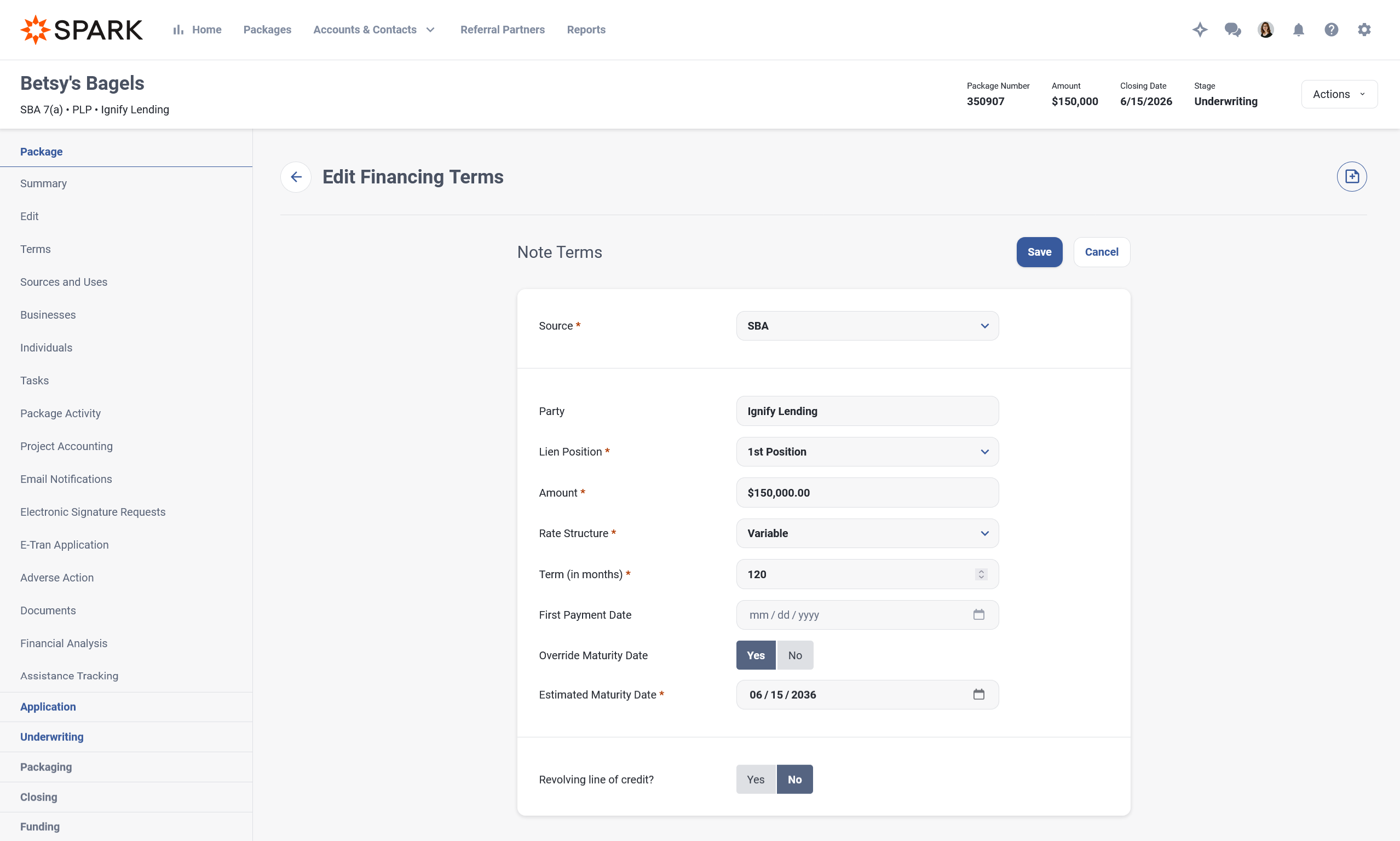
Terms Listing and Edit Terms Updates
The Terms experience has been refined for clarity.
The "Amount" column has been renamed to "Note Amount"
"Payment" is now the last column in the Terms table
On Edit Terms, Maturity Date is now visible directly under "First Payment Date" and can be overridden by users who have the permission "Can Override the Estimated Maturity Date."
Total Exposure
Total Exposure has been redesigned to give lenders a clearer view of an obligor's complete financial relationship. The new design also adds flexibility in managing what is included.
For new packages created after the release, Total Exposure uses updated inclusion logic that no longer relies on Primary Business. Any other package or debt obligation in SPARK is now included automatically when at least one borrower, guarantor, business, or individual matches an obligor on the current package. A single obligor match is enough to trigger inclusion.
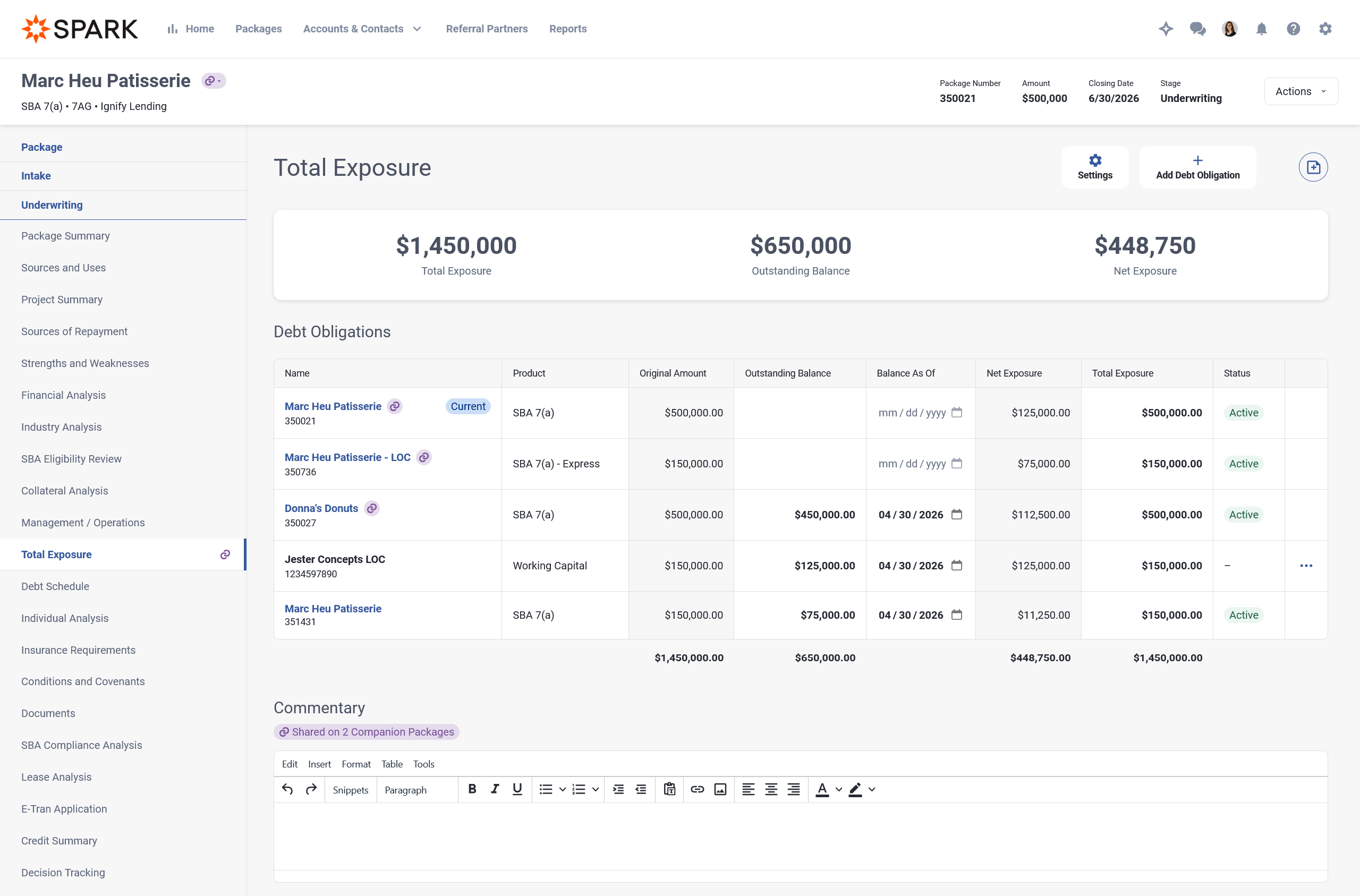
Existing packages display a banner with the option to apply or dismiss the new logic
Complete Packages do not automatically receive new packages or debt obligations into their Total Exposure
Declined or withdrawn packages with no related packages or debt obligations now display an empty state
Users without the "Can Manage Total Exposure" permission see a read-only view
A "Balance As Of" date has been added
Outstanding Balance, Balance As Of, and Total Exposure can now be edited directly in the table
Package Number or Identification Number appears below the name of each package or debt obligation
Maturity Date remains visible when a lease is present, and can only be added in this view for Lease packages
The Companion Package icon continues to display when a package is a companion
Total Exposure Settings
A new Settings panel lets lenders manage which packages and debt obligations are included. Available items follow the same obligor matching logic as default inclusion. Items can be selected, deselected, and reordered - the current package always remains first in the list.
Track Debt Obligations Independent of Packages
Lenders can now record debt obligations directly without creating a complete package. Previously, every debt obligation in SPARK was tied to a package. Now, debt obligations are stored as global records that can be referenced across packages.
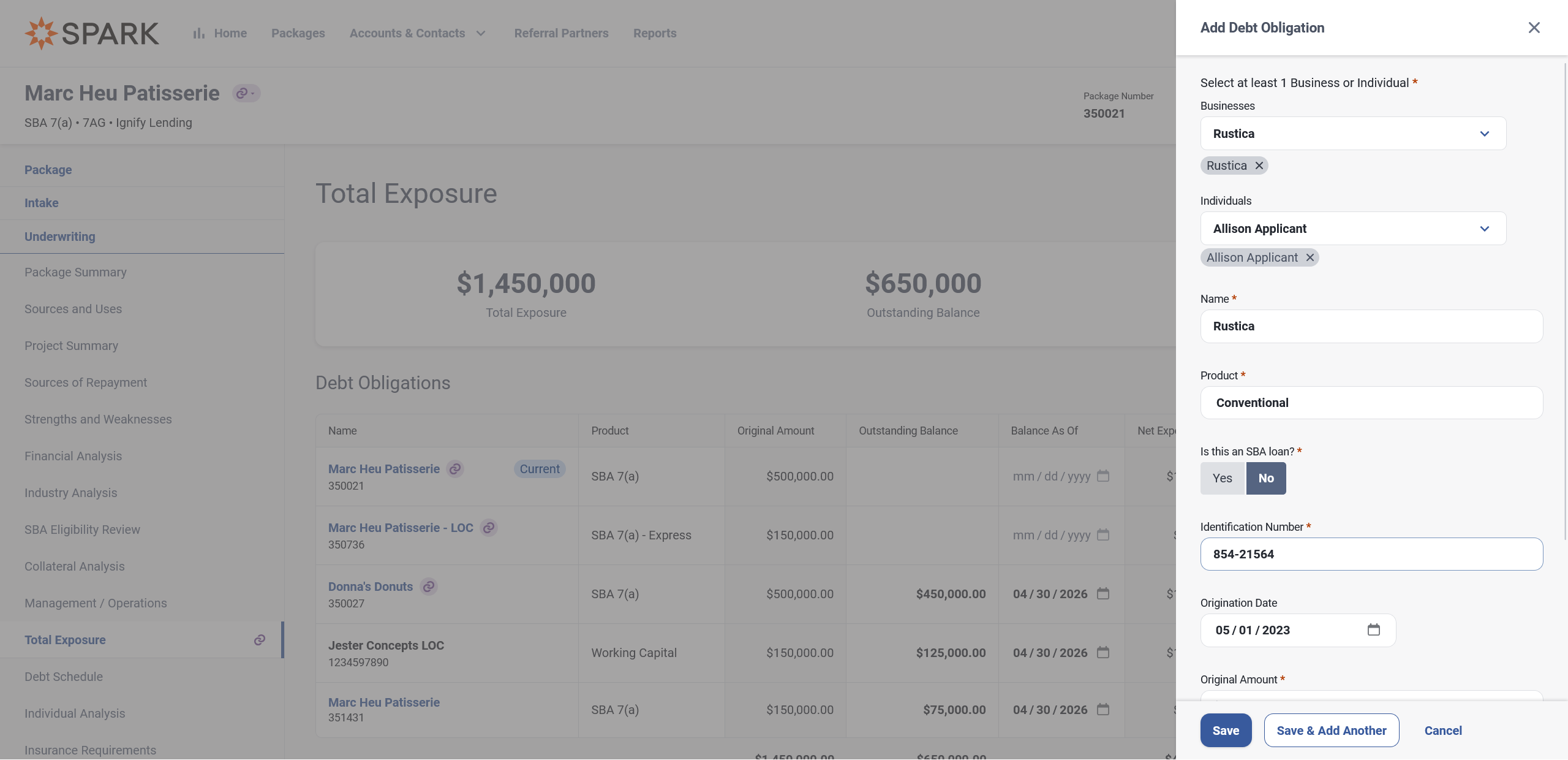
When adding or editing a debt obligation, the panel includes:
Businesses and Individuals (at least one business or individual is required)
Name, Product, Identification Number, and Original Amount (required)
"Is this an SBA Loan?": when Yes, Guaranty Percentage is required
Origination Date, Outstanding Balance, and Balance As Of (optional)
Editing a debt obligation behaves like creation, with a Delete action available. Created date and user name are shown in the Settings panel. Deleting a debt obligation removes it from any associated packages in SPARK.
A new permission, "Can Delete Debt Obligations," controls which users can remove a debt obligation from SPARK.
Account Detail Page
Under Accounts & Contacts, the Account Detail page now displays Total Exposure, Outstanding Balance, and Net Exposure for the account, calculated using the same obligor matching logic applied to packages and debt obligations.
Companion Credit Memo - Total Exposure
The Companion Total Exposure section now displays a separate Total Exposure table for each package. The Commentary remains shared and appears once beneath the final package's table - similar to how Sources & Uses renders. Lenders who prefer a single combined table can continue using the standard Total Exposure section instead.
Financial Analysis
We have been hard at work refreshing the Financial Analysis user experience.
View & Manage Financial Analysis
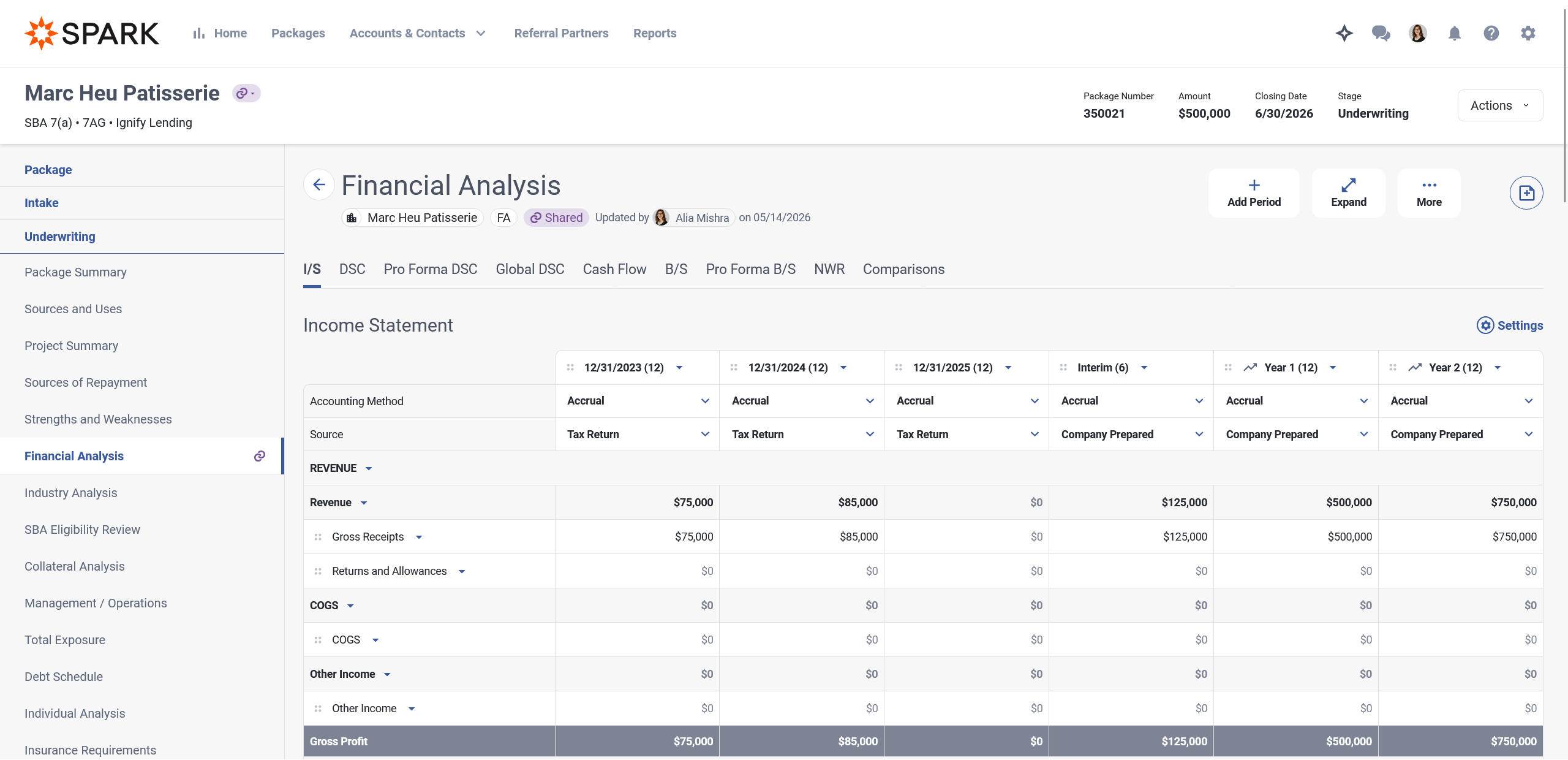
"Last Updated" date and user name are shown
All Statements follow updated design patterns
Statement Settings panels have been updated to better distinguish settings that affect the SPARK UI from settings that affect the Credit Summary
Periods are now toggles to show or hide, replacing the previous check boxes
Debt Service Coverage
"Proposed Business Debt" sub account has been updated to "Primary Business Debt." "Existing Business Debt" sub account has been updated to "Other Business Debt." These sub account names are configurable and can be updated by contacting your Customer Success Manager.
For Global DSC, lenders can now choose which Financial Analysis to use when an available business has more than one - for example, a corporate guarantor or affiliate. The choice is made directly in Settings, and the drop down shows the Financial Analysis description.
Tool tips for several DSC sub-accounts have been rewritten for clarity. Affected sub-accounts include Affiliate Net Cash Flow, Affiliate Income, Personal Cash Flow, Personal Income, Primary Business Debt, Other Business Debt, and Other Project Debt, along with the Stressed Analysis behavior for each.
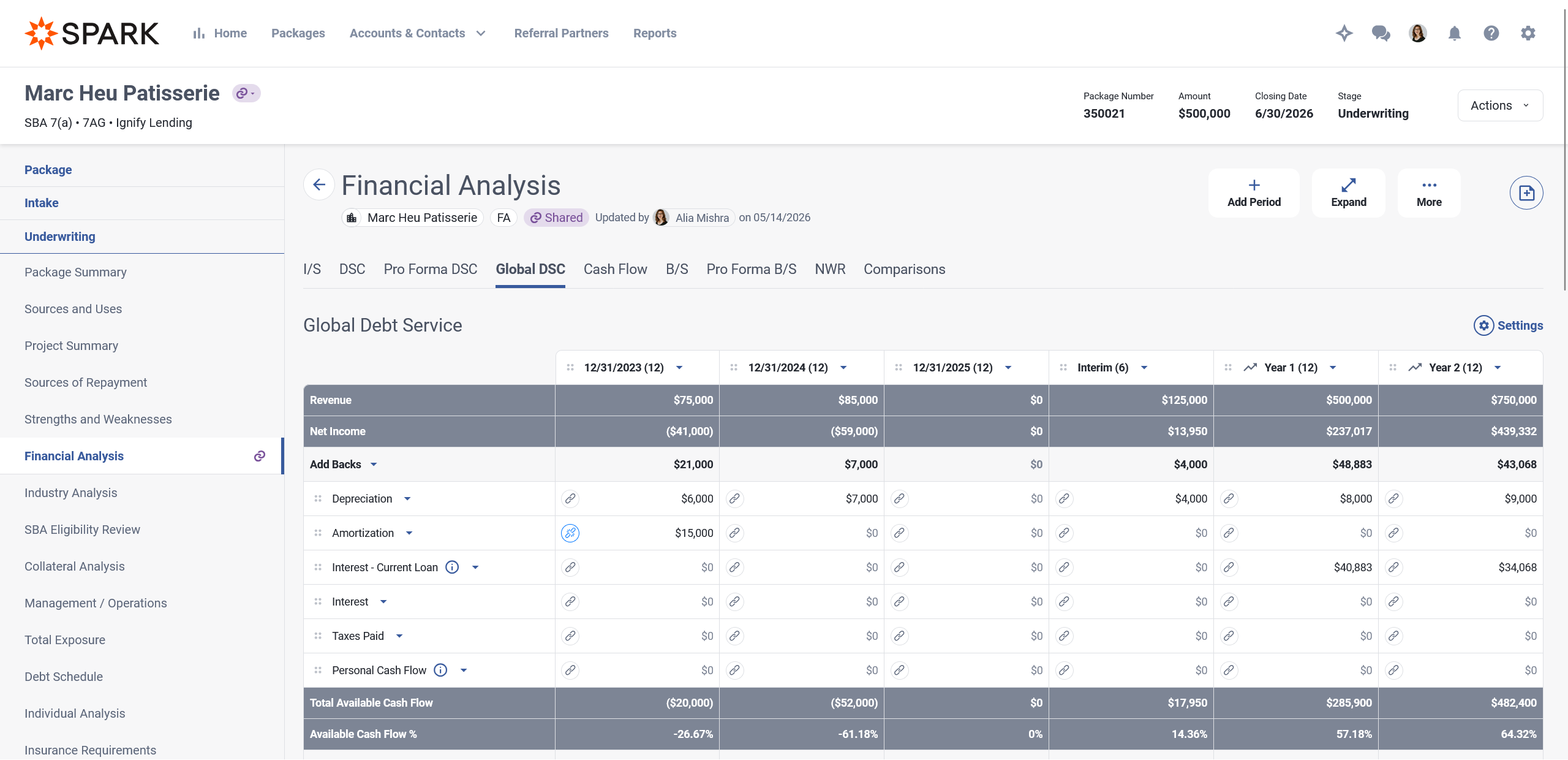
A new pair of icons identifies whether a cell value is synced or overridden.
A link icon appears next to synced values; hovering reveals a "Synced value" tool tip
When a value is overridden, the link icon is replaced with a broken link icon
Hovering over the broken link icon reveals a "Restore original value" option. Clicking it restores the synced value and removes the override
Consolidated Analysis
Listing
"Included Analyses" now appear in the Financial Analysis list.
Edit Consolidated Analysis
The previous read-only-cell-plus-modal workflow has been replaced with direct in-cell editing.
Values can now be adjusted directly in the cell
The separate Adjustment Amount field has been removed from the UI; adjustments are now made by editing the cell value
Clicking the broken link icon on an adjusted cell restores the original value
Hovering over the red triangle on an adjusted cell shows the original value followed by the adjustment amount in parentheses (for example, $166,992 adjusted by ($16,992)), along with any existing comment
The hover panel includes "Add comment" when no comment exists, or "Edit" when one does; comments can also be deleted from the edit comment panel
Clicking the link icon on a cell opens the breakdown of values that make up that cell (previously accessed via the "View Sub Account Details" modal)
Improved Deduplication
The Consolidated Income Statement, Debt Service, and Pro Forma Balance Sheet now correctly deduplicate values that could previously be counted multiple times when shared across included businesses. Existing adjustments are preserved and applied to the updated deduplicated base. The View Sub-Account Details modal shows only the values used in the calculation.
Individual Analysis
Debt Schedule
A Settings panel now lets lenders show or hide the Debt Schedule on the Credit Summary. A "Hidden" indicator appears when a Personal Debt Schedule is hidden from the Credit Summary.
Personal Financial Statement
A "Hidden" indicator now appears when a Personal Financial Statement is hidden from the Credit Summary.
Personal Cash Flow
The Personal Cash Flow user experience has been updated to follow the same patterns as Financial Analysis.
An empty state is now present on the Cash Flow tab when no cash flow has been created
Lenders can select Create when no Spouse is present, or Create Joint / Create Individual when a Spouse is present
The more menu on Period has been replaced with a drop down
The Settings panel has been updated to focus on showing or hiding from the Credit Summary; a Hidden indicator appears on the page when hidden
Adding a period now opens a Manage Periods panel with the option to show or hide periods and create new ones
The right-side more menu has been replaced with a drop down on each sub-account
"Add/Edit Note" on a sub-account is now "Add/Edit Comment"
AI Document Classification
Collateral Document Types Excluded from Classification
The AI document classifier no longer recommends document types that require collateral metadata, such as collateral address or collateral name. Lenders now see only classification suggestions the system can reliably support. The exclusion is rule-based so it adapts as document type configuration changes.
Revision of Confidence Scores
Classification confidence scores are now more accurately calibrated. Lenders may notice lower confidence scores on some documents that were previously rated highly confident. This reflects more accurate calibration, not a degradation in classification quality.
Classification Rationale Usability
The AI classification rationale now appears in two clearly labeled sections instead of a single block of text, making it easier to evaluate why a document type was recommended. Font size in the classification tool tip has also been increased for readability.
Why this classification? Up to three conditional bullet points explaining the recommended document type, the entity (shown only when the document type requires one), and the year (shown only when the document type requires one)
Rationale. A one-to-three-sentence summary of the overall recommendation
The structured format appears across the bulk upload tool tip, document listing tool tip, and Classify side panel. Documents classified before this change continue to display their existing plain-text rationale without errors.
Error State for Documents that cannot be Automatically Classified
The visual state for documents that cannot be classified due to file size or format has been updated. The new state clarifies that the document does not need to be re-uploaded to the package
SBA International Trade Loan Expansion Updates
Allow Partial Change of Ownership in International Trade SBA Eligibility
Partial changes of ownership are now permitted by SBA. Under the Business Acquisition section of SBA Eligibility for SBA 7(a) International Trade loans with a business acquisition use of funds, answering "No" to "Is the Applicant purchasing 100% of the ownership interest in another small business or is it acquiring all or substantially all of the assets of another small business through an asset purchase?" no longer triggers an eligibility fail.
Qualification Category logic for International Trade SBA Eligibility
Under the International Trade section of SBA Eligibility for SBA 7(a) International Trade loans, the two ITL qualification category questions are now mutually exclusive, as SBA only accepts one qualification category per loan.
Users must answer "Yes" to exactly one of the following questions and "No" to the other:
"Will the loan proceeds help the Small Business Applicant expand existing export markets or develop new export markets?"
"Has the Small Business Applicant been adversely affected by import competition?"
Answering "Yes" to both questions results in an eligibility fail.
An instructional tooltip has been added to explain this behavior.
Project Accounting - Proof of Deposit Placeholder
When an empty "Proof of Deposit" placeholder already exists on a package, uploaded documents now attach to the existing placeholder rather than creating a new one. If no empty placeholder exists, a new placeholder is created - this matches existing behavior.
Applicant Portal - Delete Confirmation for Debt Schedule and PFS Records
A confirmation modal now appears when an applicant or referral partner deletes a record on a Debt Schedule or Personal Financial Statement. Previously, deletions were immediate and could not be confirmed.
Document Analysis Improvements
The following updates were released in a hotfix:
Improved Support for Tax Returns with Accountant-Added Annotations: SPARK now provides better support for extracting line items when accountant-added annotations such as Statement 1 or Statement 2 appear near key values. This improvement applies to Other Income, Other Deductions, and Taxes and Licenses on 1120, 1120-S, and 1065 tax returns.
Improved Handling of Energy Efficient Commercial Buildings Entries on Older Tax Returns: We’ve improved how Document Analysis handles Energy Efficient Commercial Buildings entries on tax forms for years prior to 2023. This helps reduce cases where values associated with newer form layouts may be incorrectly interpreted on older returns.
Improved Balance Sheet Extraction on Poor-Quality Scans: We’ve enhanced extraction of balance sheets and related balance sheet line items for tax returns submitted as lower-quality or difficult-to-read scans, improving overall reliability when working with varying quality of source documents.
Quick Note Timestamps
Previously, if a Quick Note was drafted and later abandoned, returning to send it would apply the original draft's date/timestamp. Quick Notes now use the date and time the note was sent, regardless of when the draft was started.
What's Been Fixed
Dashboard - Process Stage Grouping: Fixed an issue where sorting the dashboard by the stage column caused packages from different process stages to appear mixed together instead of staying grouped under their proper headings. This was resolved in a hotfix.
Dashboard (Mobile) - Switching Between List Views: Fixed an issue on mobile where users could view their dashboard but could not switch between the package list and task list. This was resolved in a hotfix.
Sources and Uses - Deleting Owner's Equity with Project Budget: Fixed an issue where deleting an Owner's Equity source of funds failed when the source was referenced by a project budget. SPARK now deletes the source cleanly when no disbursements are tied to it, and shows a clear message when disbursements exist. This was resolved in a hotfix.
Sources and Uses - Editing Source Cleared Interest-Only Months: Fixed an issue where editing a source of funds from the Sources and Uses page cleared the interest-only month values that had been entered on the Terms page. This was resolved in a hotfix.
Document Generation - SBA 1050 Full Disbursement Box: Fixed an issue where the SBA 1050 did not check the Full Disbursement box on loans that were fully disbursed at closing when fees were financed from loan proceeds. This was resolved in a hotfix.
Information Requests - Debt Schedule View Link: Fixed an issue where clicking View on a preliminary information request for a business debt schedule could open a page that did not match the rest of SPARK's styling. This was resolved in a hotfix.
Tax Guard - Disclosure Submission: Fixed an issue where Tax Guard orders could fail because required disclosure values were missing from the order. This was resolved in a hotfix.
Tax Guard - Individual Middle Initial: Fixed an issue where SPARK attempted to send a full middle name to Tax Guard when documented for an individual tax transcript order. Going forward, if the Individual has a middle name documented, it will be truncated to a middle initial for the tax transcript order as required by IRS.
Automated Document Classification - Disabled Document Types: Fixed an issue where document types that were disabled were still being included in automated classification. This was resolved in a hotfix.
Two-Factor Authentication - Remember This Browser: Fixed an issue where the "Don't ask for codes again on this computer" option stopped working, prompting users for a 2FA code on every login even when "Days to Remember Browser" was configured. We also added a "Days to Remember Browser for Two-Factor Authentication" configuration setting that allows SPARK Administrators to control how many days SPARK will remember a browser. The default is 30 days.
Electronic Signatures - Download Certificate Link: Fixed an issue where clicking the download certificate link from a filtered list of signature requests could open a page that no longer existed.
Reporting API - Companion Loan Approval Details: Fixed an issue where the v3 Reporting API did not include the approval date for companion loans.
Tasks - Invalid Date Handling: Fixed an issue where saving a task with an invalid date (e.g. 1/1/1000) could cause an error. SPARK now rejects invalid dates before they are saved.
Lumos - PRIME+ Score NAICS: Fixed an issue where PRIME+ Score orders could fail to recognize the NAICS code when it was entered as part of the order itself.
Companion Loans - Interim Loan Financing Source: Fixed an issue where the Financing Source field on an Interim Loan appeared required but did not actually block users from saving without it, leaving packages where it was missing and could only be corrected by deleting and recreating the loan
Find Out More
Stay tuned for the latest features and subscribe to your favorite categories. You can view our product roadmap at any time here.
If you have any feedback or questions, please reach out to your Customer Success Manager or submit a ticket to the SPARK Support Team.