- DATE:
- AUTHOR:
- The SPARK Team
- RELATED ROADMAP ITEMS:
- SOP 50 10 8.1 Updates
SPARK 8.3.0 Release Notes
The SPARK 8.3.0 release is planned for Wednesday, September 30th. This release includes bringing SPARK up to date with SOP 50 10 8.1 and SBA FY27 Guaranty Fee Waivers. The maintenance window will occur from 11:00 PM CT on Wednesday, September 30th through 3:00 AM CT on Thursday, October 1st.
Here is a video recording demonstrating the SBA updates in this release.
What's Changed
SOP 50 10 8.1
Package SOP versions
SBA packages created on or after October 1, 2026 follow SOP 50 10 8.1.
Existing SBA packages without an SBA Number or SBA Authorization Date are updated to SOP 50 10 8.1.
The SBA Origination Knowledge Assistant reflects SOP 50 10 8.1 with Technical Policy Updates.
General Eligibility
A new SAFER Search sub-section was added, asking "Is the Applicant required to hold a USDOT number in order to operate?" A Yes requires the search result to be uploaded before the section can pass. A SAFER Search Results document placeholder is available on every instance for SBA products and is added to Document Views in the same folders as SAM Search Results.
Required Guarantors sub-section: The logic aligns to SOP 50 10 8.1 with Technical Policy Updates. When one more more trusts owning the Applicant add up to 20% or more ownership, they must be a full guarantor for the sub-section to pass. Ownership is measured as beneficial ownership at any tier, so a trust holding its share through another business is also considered. Every other kind of owner keeps the existing 20% threshold.
Eligible Passive Company sub-section: "The Trustor is guaranteeing the loan." now reads "The Trustor is personally guaranteeing the loan."
Business Debt Schedules
Merchant Cash Advance is now Sales-Based Repayment Agreement. This type of business debt is renamed everywhere it is picked or displayed, including the business debt schedule, Sources and Uses, Information Requests, the Referral Partner Portal, the lead forms, and Credit Memos. Existing entries are renamed.
Refinance
Refinancing Merchant Cash Advances sub-section is now Refinancing Sales-Based Repayment Agreements. Answering yes to 'Will this loan refinance Sales-Based Repayment agreements reveals three questions: whether the agreement has been converted to a term loan, whether the converted loan has amortized for at least 24 months, and whether the Applicant has entered into another such agreement since the conversion. The first two pass on Yes and the third on No. You never answer the question above them, which SPARK sets from the business debt schedule.
Refinancing Same Institution Debt sub-section:
Answering No to three Same Institution Debt questions on a delegated package no longer fails the section.
"Is this a complete change of ownership and the seller's loan is being paid off with proceeds from this loan?" is reworded to "Will proceeds from this loan pay off the seller's loan in an Initial Acquisition change of ownership?"
Two questions have been added for delegated packages:
"Is the Lender unable to modify the terms of the existing loan because a secondary market investor will not agree to modified terms?"
"Is an increase in the amount of the existing SBA-guaranteed loan not possible?"
If both questions are answered no, the section fails.
Refinances sub-section: The wording of this question is updated to reflect that the 10% improvement is now measured against the existing installment amounts in aggregate, including any other debt refinanced at the same time, rather than debt by debt.
Business Acquisition
Transaction Details sub-section:
A required change of ownership category dropdown was added with four choices: Initial Acquisition, Business Expansion, Owner Buyout, and ESOP and Cooperative. An International Trade loan cannot be an Initial Acquisition.
A calculated Business Purchase Price has been added to the Business Valuation Worksheet: the total price to be paid to the seller per the purchase contract, less the appraised value of commercial real estate being financed in the purchase. This row appears on every package, whatever SOP version it follows.
A third party appraisal is now required if the Business Purchase Price is $350,000 or more and/or the buyer and seller have a close relationship.
To align to SOP 50 10 8.1 with Technical Policy Updates, when Business Purchase Price is $3,000,000 or more and change of ownership category is Initial Acquisition or Business Expansion, a new question is prompted: "Does the transaction include the acquisition of an owner-occupied Special Purpose Property that is integral to the operation of the business?"
To align to SOP 50 10 8.1 with Technical Policy Updates, a Quality of Earnings Report is now required when the change of ownership category is Business Expansion or Initial Acquisition and the Business Purchase Price is $3,000,000 or more, and a Special Purpose Property is not being acquired. The sub-section stays In Progress until the report is uploaded to the document placeholder.
Site Visit sub-section: The site visit question now covers both the Applicant and the business being acquired in one question: "Will a site visit be conducted for the Applicant and for the business being acquired?" A No shows a required Comments box asking for your reasoning for determining that a site visit would not materially enhance verification of business operations. Answering No no longer fails the section.
"Will the acquisition enhance the export operations of the Applicant or the ability of the Applicant to export?" question was removed for 7(a) International Trade and 7(a) Export Express.
We are temporarily maintaining the question "Is the Applicant purchasing 100% of the ownership interest in another small business OR is it acquiring all or substantially all of the assets of another small business through an asset purchase?" for 7(a) International Trade and 7(a) Export Express until E-Tran is updated to follow SOP 50 10 8.1.
International Trade
When the change of ownership category is Owner Buyout and the export markets question is answered Yes, the section now fails.
The loan proceeds question has been reworded:
"The loan proceeds will be used only for the following purposes, and for no other purpose:
1. Acquire, construct, renovate, modernize, improve, or expand facilities and equipment to be used in the United States to produce goods or services.
2. Working capital, up to $2,000,000 included in the loan.
3. Changes of ownership that follow SBA's change of ownership rules.
4. Debt refinancing that follows SBA's debt refinancing requirements for an International Trade loan."
The lender can now take a position other than a first lien where that position provides adequate assurance of repayment and SBA has granted a policy exception. In this case, Delegated Processing is no longer required for PLP lenders so that informational note has been removed.
Export Express
The question "Loan will not refinance an existing SBA-guaranteed loan." has been removed.
SBA Guaranty Fee Waivers
Manufacturer waiver
The manufacturer waiver now applies when the amount tested is $700,000 or less, down from $950,000. This waiver continues to test for NAICS Codes starting with 31, 32, or 33.
Food supply chain waiver
A guaranty waiver is applied to packages of $700,000 or less in the following scenarios:
Nineteen codes are decided on the code alone: 1111, 1112, 1113, 1121, 1122, 1123, 1124, 1125, 1129, 1141, 1151, 1152, 423820, 4244, 4245, 424910, 445110, 493120, and 493130.
The other two codes 484220 and 484230, also need a Yes to a new trucking question.
On the Add Business and Edit Business screens in origination, a business on an SBA package carrying NAICS Code 484220 or 484230 is now asked a required question "Does this business engage in refrigerated products trucking, farm products hauling, grain hauling, or livestock trucking?" SBA names these two codes for the food supply chain waiver, but the code alone does not decide it.
The answer is saved against the account, the same way the NAICS Code is, so it is given once and reads the same on every business record and every package.
This question is asked of every business carrying either NAICS code, not only the business tested for a fee waiver.
Saving a change to the trucking answer automatically recalculates the guaranty fee on every affected package.
Rural Waiver
A guaranty waiver is applied to an SBA package of $700,000 or less when the business address SPARK reads for it is classified Mostly Rural or Completely Rural. County rural population figures come from the County-level Urban and Rural information for the 2020 Census.
SBA Classification has been updated to align with the SBA's definition of rural: Mostly Urban under 30 percent, Mostly Rural 30 to 99.9 percent, and Completely Rural 100 percent. The classification is tracked for every address. SPARK shows it for the Project Address.
The address taken into account is the current address of the primary business, or the operating company's address when a borrower has the business role Eligible Passive Company.
New E-Tran Requirements
New Tax Delinquency Question in Business History
E-Tran now requires the borrower to answer the following question: "Is the business delinquent on any federal, municipal, or state taxes?" This question has been added to Business History. A Yes reveals a required details field and places Business History in a Review state. SPARK sends the answer to E-Tran for every business borrower on a 7(a) package.
A business that has already completed Business History keeps its current form definition until a lender accepts the banner offering the newest version. Accepting it leaves Business History incomplete until the new question is answered.
SBA Loan Number Requirement for SBA Loan Refinances
SPARK now sends the SBA Loan Number of the loan being refinanced on every SBA loan refinance, as required by E-Tran. A package refinancing an SBA loan with no SBA Loan Number recorded is now stopped before submission. The check names each refinance row that is missing one and links the user to Sources and Uses.
Additional Use of Funds Codes for E-Tran Submission
SPARK now supports three more SBA use of funds codes when submitting a loan to E-Tran: 03 (Purchase Improvements only), 07 (Pay Off Interim Construction Loan), and 08 (Pay Off Lender's Interim Loan).
Manager Dashboard Team Filtering
A manager can now scope their dashboard to specific people within a Team Role.
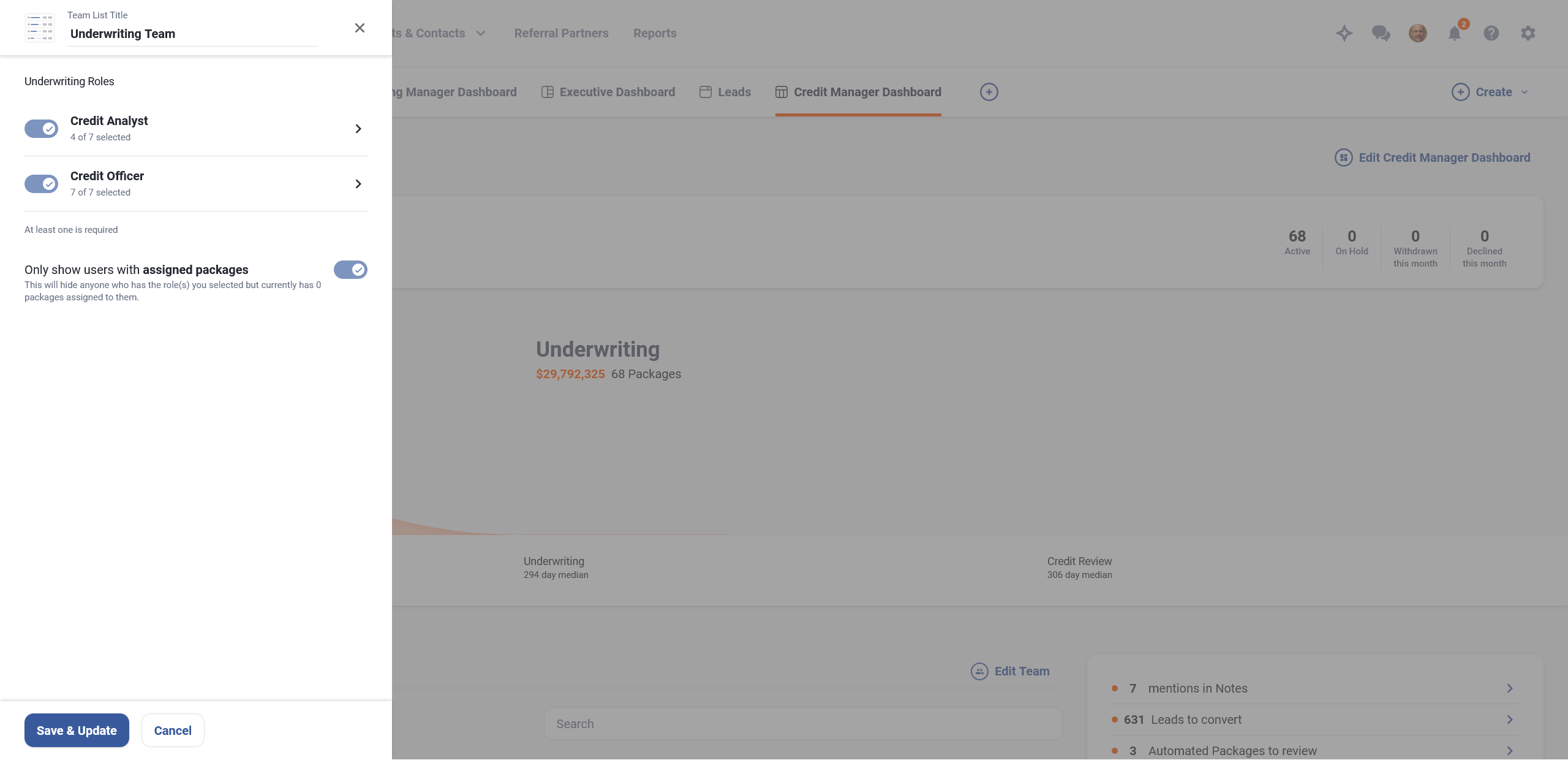
Each role on the Roles list now shows a count, for example "Package Owner (25 of 30 selected)". The checkbox includes or excludes the whole role, and clicking anywhere else on the row opens that role's sub-panel.
The sub-panel lists everyone who holds the role alphabetically, with a search field and a Select/Deselect All row. Inactive and retired users are left off automatically.
Document Analysis
Checking that a balance sheet adds up
An analyzed balance sheet now shows the total reported on the tax return alongside a calculated total, so a misread figure does not pass into the financial analysis.
The Assets section and the Liabilities and Shareholders' Equity section each end with two rows, "Reported from Tax Return" and "Calculated", and each moves into its own panel to match the income statement.
You can correct a misread reported total and it saves automatically. The calculated total is read-only and recomputes as you type.
The calculated total reads green when it equals the reported total and red when it does not. Equality is exact, so a difference of a cent reads red.
A section that does not match adds an entry to the "Please review the following items for accuracy" banner at the top of the page.
A balance sheet whose totals do not agree is now treated the same way as an unreconciled income statement.
Needs Review is shown on Document Analysis Results in both the statement navigation and the document list.
In origination, it adds one confidence warning against the business on the automated package summary, and the tax return analysis step in an automation workflow takes its Below Confidence Threshold path, so the package waits for a person.
Excluding the balance sheet does not stop the check, though the automated package summary drops the warning from its count.
Nothing blocks. You can complete the analysis and apply it with the balance sheet unreconciled.
Resolving a low-confidence warning on a total does not clear a mismatch. Only making the figures agree does.
Clear reasons when an analysis fails
A failed tax return analysis now shows you one of two plain reasons, in the same words on the failure notification, on the alert you open, and in the document listing.
On a timeout: "Your request to analyze tax returns took too long to complete. Try again with fewer documents."
On every other failure: "This analysis could not be completed. Please submit the request again."
A submission that could not be sent fails immediately
When SPARK cannot hand the documents to the analysis service, the submission is now refused on the spot rather than leaving you waiting on an analysis that never started. You read "This analysis could not be started. Please submit the request again." and stay on the document selection screen with your documents still selected. Nothing is left behind, and nothing counts against the monthly quota.
Sole proprietors with no business name
When a sole proprietor's tax return carries no business name, typically on a 1040 Schedule C, the analysis now uses the individual's name instead of leaving the value blank. A business name that is present is never overwritten.
Date Established is now optional
Tax return analysis can be saved and completed with Date Established blank, so you are not blocked when the value is unknown or unavailable. No placeholder or inferred date is filled in.
Credit bureau provider endpoints moved to XedaLink domain
XedaLink is moving MeridianLink endpoints to their domain, so SPARK's configured URLs are being updated credit requests continue routing correctly.
What's Been Fixed
Credit Report Documents in Servicing Workspaces: Fixed an issue where a credit report stored on a servicing workspace could not be opened. This was included in a hotfix.
Lead Form Submissions When Legacy Lead Forms Are Disabled: Fixed an issue where a legacy lead form could still accept and record a submission for a lender that had legacy lead forms turned off. This was included in a hotfix.
Tax Return Analysis - Balance Sheet Setting: Fixed an issue where spreading a tax return into an existing financial analysis returned a validation error saying the return was not configured for automated balance sheet spreading, even for lenders that do not have Schedule L and balance sheet spreading turned on.
Tax Return Analysis - 1040 Schedule C Improvements: Fixed several extraction issues related to 1040 Schedule C due to line item changes in the 2025 version of the tax form.
Financial Analysis Number Pad Enter Key: Fixed an issue where the Enter key on the number pad did not move the cursor down a row while editing a cell, so it now behaves the same as the main Enter key.
Conditions and Covenants Text in Credit Memo: Fixed an issue where typing certain characters into conditions and covenants could render incorrectly in the generated memo.
Adding Third Party Users Without an Email Address: Fixed an issue where adding a third party user to a package returned a "username already exists" message, and where searching for an external user with no email address on file returned no results.
Performance Improvements: Continued performance-related improvements across several areas of the application to improve page load times and overall responsiveness.
Find Out More
Stay tuned for the latest features and subscribe to your favorite categories. You can view our product roadmap at any time here.
If you have any feedback or questions, please reach out to your Customer Success Manager or submit a ticket to the SPARK Support Team.