- DATE:
- AUTHOR:
- The SPARK Team
SPARK 8.3.1 Release Notes & Webinar
The SPARK 8.3.1 release is planned for Saturday, November 7th. This update adds entity extraction to AI Document Classification and expands AI Narrative Generation. The maintenance window will occur from 11:00 PM CT on Saturday, November 7th through 9:00 AM CT on Sunday, November 8th.
Please join us for a release webinar on Thursday, November 12th at 11:00 AM CT, where you can see a demonstration and ask questions about the content of this release. Sign up for the webinar using this link.
Release Highlights
AI Document Classification now reads which entity each document is associated to, even when that business or individual is not on the package yet. You can create the business or individual straight from those bulk uploaded documents.
The Narrative Assistant can now draft six more commentaries: Credit History, Personal Financial Statement, Personal Cash Flow, Collateral, Sources and Uses, and Project Summary.
Locked-out users can now unlock their own account by resetting their password, and administrators can see and unlock locked users from Configuration.
Lenders can now see which Tax Transcript tasks are waiting on applicant consent directly from View Applicant Portal.
AI Document Classification
New: Suggested entities from auto-classified documents
When SPARK auto-classifies a document on a package, it now also identifies the business or individual the document is associated to, even when that entity is not on the package yet. Documents associated to the same new entity are grouped together and shown as a suggested entity in Bulk Upload and Review AI Classifications.
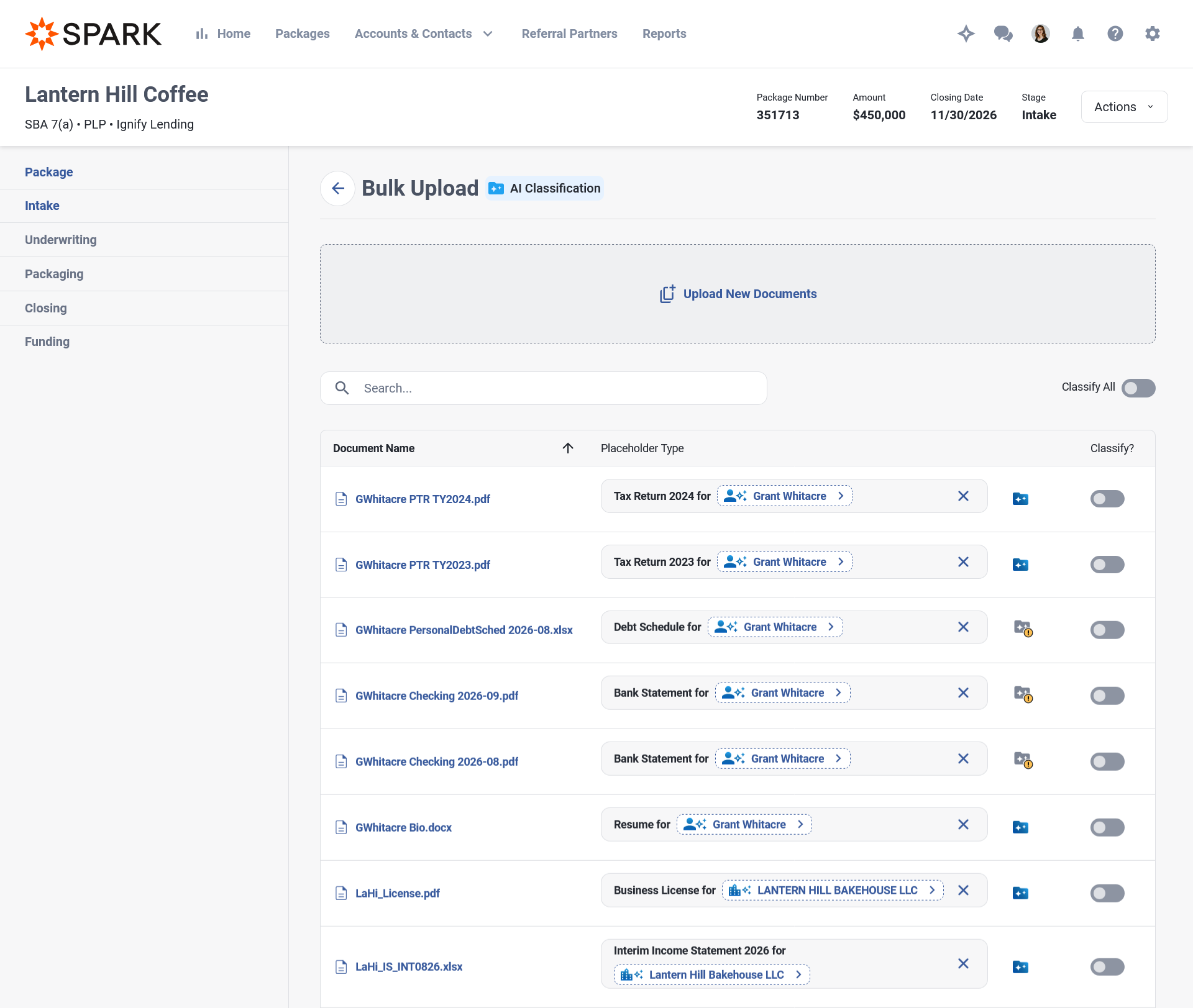
When a document is associated to an entity already on the package, SPARK selects that entity for you.
A document that needs an entity is now kept until you choose one, even when no match exists yet.
A document that fails to classify now shows as failed instead of staying in pending.
Review AI Classifications now updates as results arrive, without a page reload.
Suggested entities are available on packages only.
New: Create a business or individual from a suggested entity
Click a suggested entity to open the Add Business or Add Individual side panel, already filled in from its documents. Review the details and save, and the new entity is attached to every document waiting on it.
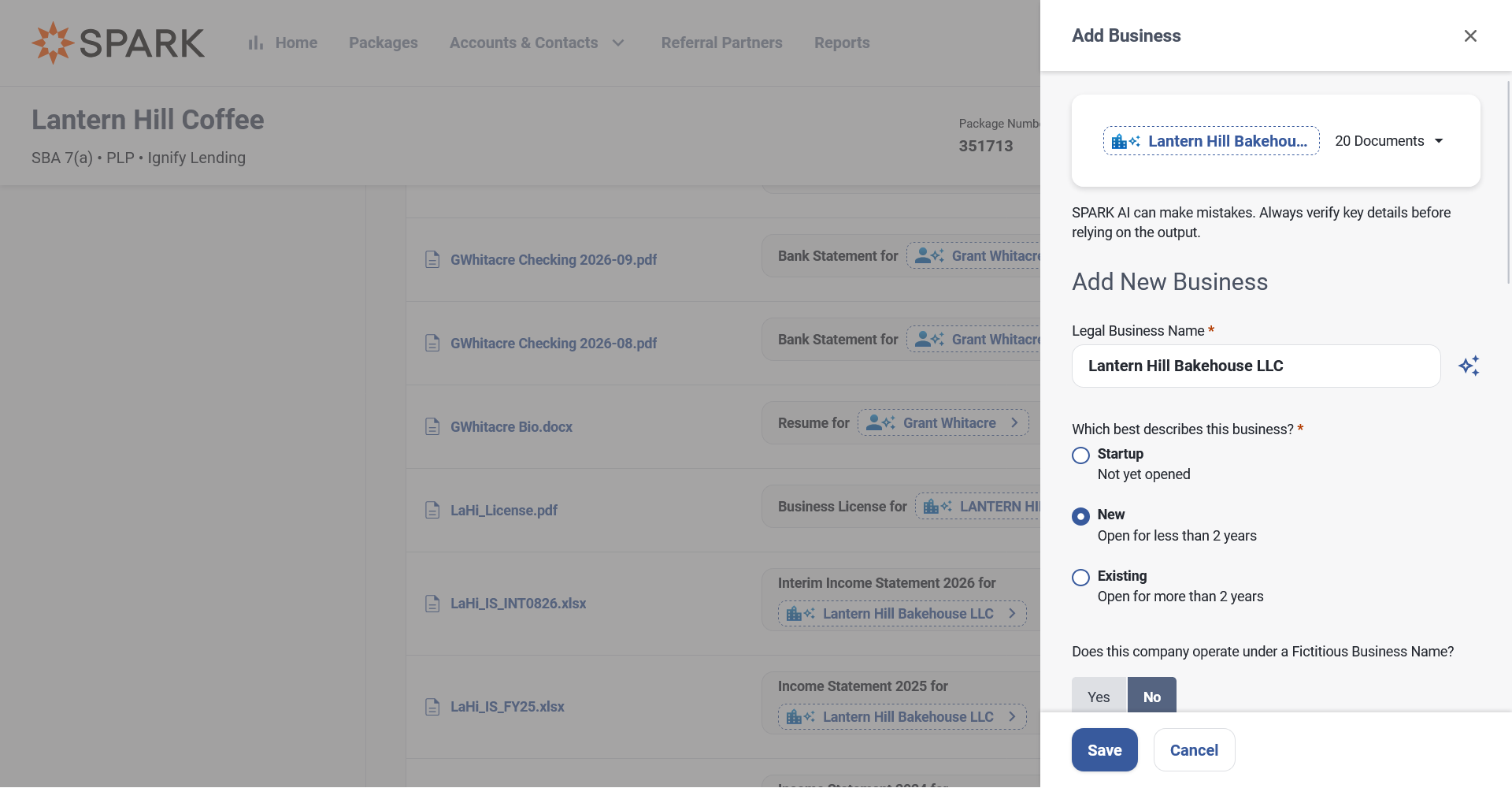
Every filled field is marked as AI-filled and can be edited. Fields SPARK is less certain about are marked as low confidence.
The panel lists the source documents so you can check them.
When the business or individual already exists elsewhere in your SPARK, the panel offers that record so you don't create a duplicate.
Tax identification numbers are never filled in.
AI-Enabled Narrative
New: Six more commentaries can be drafted with AI
The Narrative Assistant's Generate action now covers six more commentaries, joining the sixteen that already had it. Each draft uses only SPARK's data and the documents you select. Drafts never search the web, never state a figure SPARK did not supply, and never recommend approval or decline.
Project Summary is one paragraph on who is buying what, for how much, and how the deal is funded, including EPC/OC transactions.
Sources and Uses describes how the transaction is funded and what the money buys, across every package in a companion group. Only saved allocations are used.
Credit History describes the individual's credit standing: the score against your ranges, the debt picture, and derogatory and alert history. The individual's name and Social Security number are never sent to the AI. If no usable report exists, the panel explains why (no report, frozen, pending, or no data) and what to do next.
Personal Financial Statement describes net worth, the makeup of assets and liabilities, income and contingent obligations. A joint statement produces one draft covering both spouses, and lender adjusted amounts are included when enabled.
Personal Cash Flow walks through income, add backs, expenses and distributions period by period, and quotes Debt Coverage Ratio and Debt to Income Ratio as SPARK calculated them. Hidden periods are left out. On existing instances, this commentary is available on request from your SPARK administrator.
Collateral describes what is pledged, its value, prior claims and your enabled collateral calculations, using your own labels. In the servicing workspace, the Current and Proposed analyses each draft separately, and a Proposed draft describes changes as proposed rather than agreed.
Redesigned Select Documents panel
Select Documents when generating narrative now lists every readable document for the entities a commentary is associated to, grouped by the associated entity.
There is a group for each business and individual, a joint group for a married couple's joint documents, a Package group for documents with no entity, and Miscellaneous for unclassified documents.
Image files in .jpg, .jpeg, .png, .tif, .tiff format can now be selected, along with .pdf, .doc, .docx, .xls and .xlsx.
Credit Reports and Credit Report Request Authorizations can no longer be selected. Bank Credit Reports and Business Credit Reports still can.
Each selected document must be under 10 MB. Generate Narrative stops before any AI credits are used and lists any oversized documents, so you can remove them and try again.
Sign-In and Account Security
Clearer lockout after failed sign-ins
Users are now less likely to be locked out by a few scattered typos, and a locked-out user can get back in without contacting support.
Failed attempts now lead to a lock only when they happen within a short time. The count starts over after a stretch with no failed attempts.
A locked account unlocks automatically after a set number of minutes.
A password reset unlocks right away. Users no longer need to wait for the lock to end.
Instead of "Account is locked.", users now see "Your account is locked after too many failed sign-in attempts. Reset your password to unlock it now, or try again in [N] minutes."
The number of attempts and the length of the lock come from your existing "Maximum failed login attempts" and "Failed login window (in minutes)" settings.
Inactive-account message at sign-in
A deactivated or retired user who attempts to log in is now told the account is inactive, instead of seeing "Account is locked."
Internal users see "This account is inactive. Contact your SPARK administrator for help."
Applicants, partner users and referral partners see "This account is inactive. Contact [Lender name] for help."
Applicant email verification no longer reveals who has an account
The "Check Your Email" screen and applicant sign-in no longer indicate whether an email address has a SPARK account. "Send email again" always shows "If that email needs verifying, we've sent a new link." An unverified applicant reaches the verification step only after entering the correct password.
Longer passwords
Passwords can now be up to 64 characters when your instance has no maximum password length set. Instances with a maximum already set keep that value.
Administrators can see and unlock locked-out users
The Locked badge on the user list in Configuration now reflects users who are actually locked out, and Unlock is available in their actions menu. Unlocking a user requires the appropriate permission for that user type.
Pending Tax Transcript tasks in View Applicant Portal
View Applicant Portal now shows a Pending Tasks card with each Tax Transcript task waiting on applicant consent, along with its due date. You can also view the card as a specific applicant to see only their tasks.
Total column on the 12 Month Cash Flow in Credit Summaries
The 12 Month Cash Flow in memos now has a Total column after Mo 12, matching the Total on the financial analysis screen. It appears in every memo section that shows the 12 Month Cash Flow.
Formulas in the Personal Debt Summary
You can now type formulas into the Personal Debt Summary, the same way you do in financial statement spreading, so there is no longer a need to total tradelines by hand first. This is available when adding a manual credit report, editing a manual credit report, and on the Credit History tab in Individual Analysis.
Balance As Of date in the API
Packages in the API now return a Balance As Of date alongside the outstanding balance, so you can see when the balance was accurate. Balances sent when an integration creates or updates a package are now dated today.
What's Been Fixed
Closed Loans on Executive Dashboard: Fixed an issue where the closed loans figure on the Executive Dashboard included withdrawn and declined loans. The dashboard now also uses a loan's actual closing date when one is set. This was included in a hotfix.
NAICS Codes on Automated Package Creation: Fixed an issue where NAICS codes entered for businesses while creating an automated package did not appear on the business profiles in the created package. This was included in a hotfix.
Edit Personal Debt Summary in Individual Analysis: Fixed an issue where the Edit Debt Summary page on the Credit History tab could fail to load. This was included in a hotfix.
Deleting an Item in the Business Debt Schedule: Fixed an issue where a business debt schedule item could not be deleted after the refinance use of funds tied to it was changed to a different debt schedule item.
Disbursement Manager - Credits on the Project Budget: Fixed an issue where disbursement credits were left out of the total paid on the Project Budget page after a new project budget was created.
SPARK API - Document Downloads for API Clients: Fixed an issue where an integration signed in with a client ID and secret received a 404 Not Found when downloading a document's file, even when its API role allowed document downloads.
SPARK API - Document Upload Checks: Fixed an issue where document uploads through the API skipped the supported file type and 100 MB size checks that the Documents screen applies.
SPARK API - Not Found Responses: Fixed an issue where API write requests that named a record that does not exist returned a 400 Bad Request instead of a 404 Not Found.
Performance Improvements: Continued performance-related improvements across several areas of the application to improve page load times and overall responsiveness.
Security Updates: Applied security updates to several third-party components used by SPARK and its supporting services, removed unused system packages from several supporting services, and strengthened request validation on several screens.
Find Out More
Stay tuned for the latest features and subscribe to your favorite categories. You can view our product roadmap at any time here.
If you have any feedback or questions, please reach out to your Customer Success Manager or submit a ticket to the SPARK Support Team.